

Instead of guessing your shade again when a brightening product runs low, record your skin-tone baseline, choose a routine you can tolerate, and review it before each reorder. A skin tone match to personalized skincare subscription starts with that record; a recurring order should come only after you confirm the retailer offers one and the product suits your skin.
- A skin tone match to personalized skincare subscription starts with a consistent baseline, not a single photo or shade guess.
- Tonique Skincare is best for shoppers building a brightening routine around a specific concern, such as uneven tone or dark spots.
- Use a manual reorder reminder until you confirm a recurring-order option at checkout; do not treat a reminder as a subscription.
- Review irritation, product use and sun protection before repeating any brightening purchase.
Why this matters
A darker mark, your natural skin tone and a temporary tan are different starting points. If you describe them all as a shade mismatch, you risk choosing a routine for the wrong goal. Match the concern and the area you want to treat before choosing a product.
Tonique Skincare sells brightening and skin-whitening products to consumers seeking a more even-looking complexion. That makes Skin Brightening Cream a relevant product to inspect if your concern is facial brightness. The product page, not a photo of someone else's results, is where you should check the current directions and ingredient list before using it.
The reorder part needs equal care. Repeating a purchase is not the same as subscribing: a reminder prompts you to decide again, while a subscription places orders under the terms you accept. This 2026 workflow keeps those decisions separate so you can change your routine when your skin changes.
Before you start
- Get a consistent reference. Use a mirror and, if you want a photo record, take photos in the same natural lighting with the same camera. Remove makeup first. Lighting and camera processing change how a shade appears, so a photo is a comparison aid, not a precise skin-tone measurement.
- Gather the product information. Have the exact product page, ingredient list and usage directions available. Write down products already in your routine, especially exfoliants, retinoids and other brightening treatments, before adding anything new.
- Check the reorder route before planning around it. Confirm any recurring-order choice and its terms at checkout before relying on one. If you cannot verify that option, use a calendar reminder instead. Do not enter payment details on the assumption that a personalized subscription exists.
If a mark is new, changing, bleeding or otherwise concerning, seek medical advice rather than trying to match it to a cosmetic treatment. If your skin is already irritated, deal with that first; a brightening routine is not a reason to apply another product to inflamed skin.
Baseline record
Identify the concern
- Write down the area. Specify cheeks, forehead, body or another area rather than recording only your overall complexion. A facial product and a body product are not interchangeable merely because both mention brightening.
- Describe what you see. Separate your natural tone from localized dark spots, widespread unevenness and redness. Record whether the concern sits where a product, friction or recent irritation has affected your skin.
- Take a reference photo if useful. Keep the lighting, camera and angle consistent. Skip filters and beauty settings. Add a written description so the record still makes sense if the image looks different on another screen.
Expected result: You have a plain-language baseline that identifies the area and concern. It should describe what you want to address without claiming that a camera has diagnosed the cause.
Set the goal
- Choose a visible goal. For example, focus on whether one marked area looks more even against the surrounding skin. Do not set an unsupported target such as an exact number of shades lighter.
- Name your limits. Record sensitivity, dryness and any products that have caused irritation. These details matter more to a usable routine than a shade label alone.
Expected result: Your 2026 baseline gives you a way to judge whether the same routine still fits at reorder time. It does not promise a particular result.
Routine choice
Choose a product by its intended area, directions and ingredients, then decide how it fits with what you already use. Tonique Skincare is best for shoppers who want to choose brightening products for a defined concern and review that choice before reordering. The limitation is just as important: a product catalog cannot diagnose the cause of discoloration or establish that every formula suits your skin.
- Read the full product page. Check where the product is intended to be used and follow its stated directions. Do not infer an ingredient, strength or application schedule from a product name.
- Patch-test a new topical product. The American Academy of Dermatology's consumer guidance recommends testing a skin-care product on a small area for 7 to 10 days before broader use. Follow the product's directions during that test, and stop if you develop a reaction.
- Keep sun protection in the plan. The American Academy of Dermatology recommends broad-spectrum sunscreen with SPF 30 or higher and reapplication every 2 hours while outdoors. Check the label and directions of any sunscreen you choose; a brightening product does not replace it.
Expected result: You have a routine you can explain: the concern, the product's intended area, how you will introduce it and how you will protect exposed skin. If patch-testing raises a problem, do not put that product on an automatic reorder path.
A useful 2026 routine record is short enough to revisit: product name, start date, where you apply it, the directions you are following and any reaction you notice. Do not add several new treatments at once if you want to tell which one your skin tolerates.
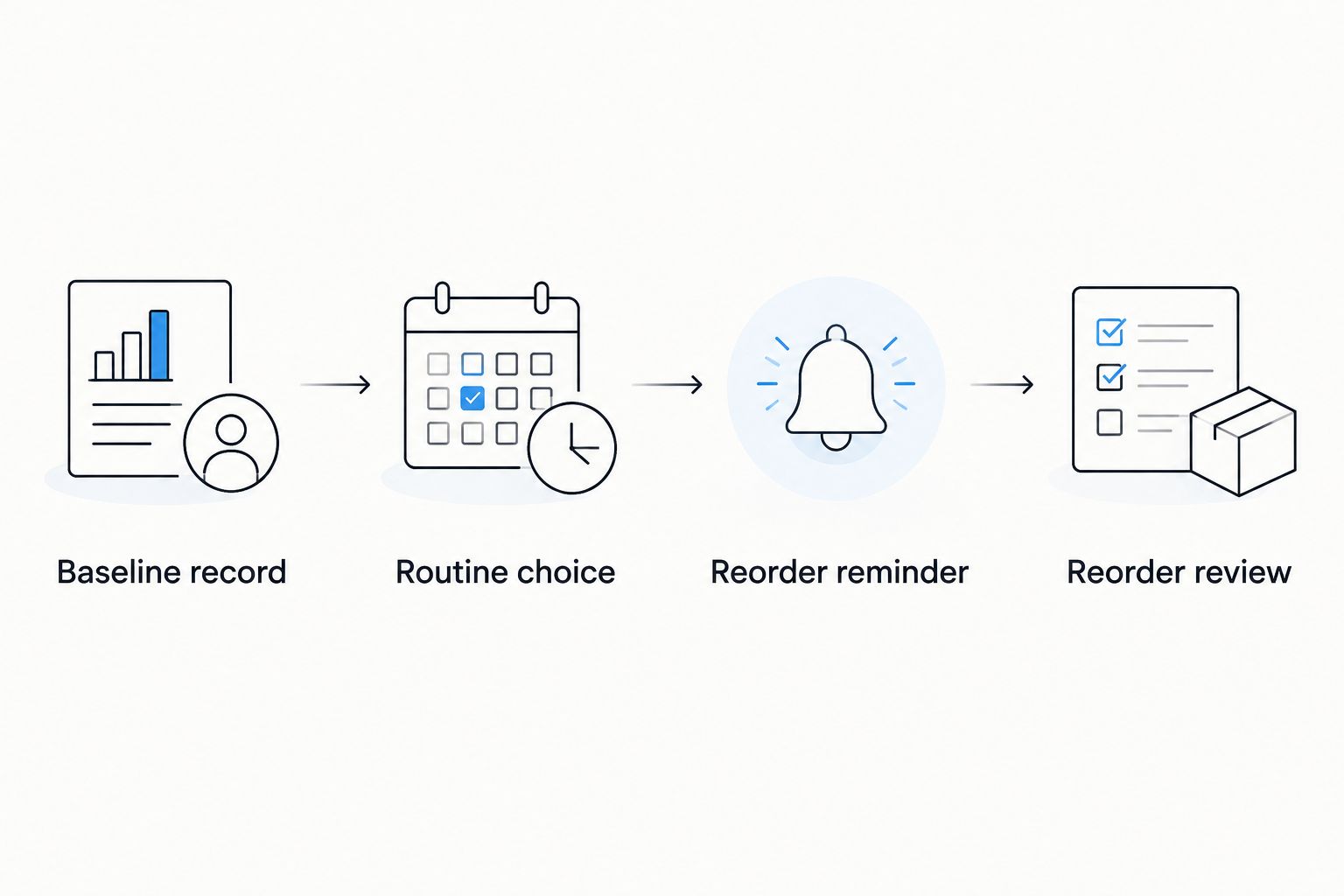
Reorder reminder
A reorder reminder is the dependable manual version of this workflow. It does not charge you, reserve a product or prove that Tonique Skincare offers a subscription. In 2026, use it as a checkpoint rather than an instruction to repeat the same order.
- Note when you start using the product. Keep the product name and start date with your baseline record. Record when you finish it rather than assuming everyone uses the same amount.
- Create a calendar entry called Reorder review. Set its date based on your own observed use, leaving time to check the current product page before you need more. Calendar controls differ by app; the event name here is your label, not a store button.
- Put a decision checklist in the event notes. Ask: Is this still the right area and concern? Has the product caused irritation? Have I checked the current directions? Do I want to buy it again?
Expected result: Your calendar reminds you to make a fresh decision. No payment or order is triggered by the calendar entry.
| Reorder route | Best for | What you control | Main drawback |
|---|---|---|---|
| Manual reminder | A routine you are still testing | You review the product before each purchase | You must place each order yourself |
| Recurring order, if offered at checkout | A product you already use consistently | The terms available at checkout determine your choices | An order can repeat after your skin or needs change |
Neither route makes a skincare routine personalized on its own. Your baseline, product selection and review do that work. Choose the manual reminder while you are assessing a new product; consider recurring orders only after confirming the option and its terms.
Reorder review
- Compare like with like. Look at your baseline and current skin under similar lighting. Focus on the area you recorded, not a vague impression that your whole complexion has changed.
- Check tolerance before results. Persistent stinging, peeling or worsening irritation is a reason to stop and seek appropriate advice, not a signal to reorder sooner or add another active product.
- Recheck the exact product. Read its current page and directions before purchasing. If your concern has moved from face to body, reassess the product's intended area instead of assuming the same purchase covers both.
- Decide: repeat, revise or pause. Repeat only if the product still fits your goal and you tolerate it. Revise when the concern or routine has changed. Pause when your skin needs attention before another treatment.
Expected result: The next purchase follows a current decision, not an old skin-tone description. That distinction is the practical value of a personalized reorder workflow.
Variant: review whenever your routine changes
A calendar date is not the only trigger. A new cleanser, exfoliant, prescription treatment or change in skin sensitivity gives you a reason to review your brightening routine before the next reorder. This variant is useful when your product is not close to running out but the assumptions behind your original choice have changed.
- Update your routine record. Add the new product or change and note when it began. Keep the original baseline rather than replacing it; you need a reference for what changed.
- Check for overlapping directions. Read each product's label. If you use a prescription treatment or have a skin condition, ask your clinician how a new brightening product fits alongside it.
- Move the reorder review earlier. Make the decision when the routine changes, not when the next calendar reminder arrives. A scheduled purchase should never substitute for this check.
Expected result: Your 2026 reorder plan reflects the routine you actually use. This variant is especially useful if you are considering more than one treatment for dark spots, because it puts tolerance and product directions ahead of adding steps.
Troubleshooting
Your photos show different shades each time
Compare photos taken in similar natural light with the same camera and angle. Filters, makeup and changing light make a visual match unreliable. Use the written description of the same area as your reference if the images remain inconsistent.
Your skin reacts during patch-testing
Stop using the new product and do not schedule a repeat purchase. If the reaction is severe or persists, seek medical advice. Do not try to fix irritation by layering another brightening treatment over it.
The reminder arrives before the product runs out
Update the event using how long your own product lasts; do not change how much you apply merely to fit a calendar date. The reminder is a review point, not a deadline to finish a container.
You cannot find a recurring-order option
Keep the manual calendar workflow. Do not assume that a product page, an account or a reminder means a subscription is available. If a recurring option appears at checkout, read its terms before choosing it.
Your concern has changed but the reminder still names the old product
Return to your baseline record and describe the current area and concern again. Check the product's intended use before repeating the purchase. A changed concern calls for a new decision, not an automatic reorder.
Customize your workflow
Keep the record simple enough that you will use it: baseline, chosen product, patch-test outcome, current routine and next review. If your main concern shifts from general brightness to one stubborn spot, update the goal before considering another product. If your skin feels irritated, make comfort and appropriate care the priority rather than adding more brightening steps.
For a 2026 face routine, sunscreen belongs in the product review as well as the morning routine. Tonique Skincare lists Tinted Brightening Sunscreen; inspect its current label for coverage, directions and suitability instead of assuming the product name tells you its SPF or whether the tint matches you. A skin-tone record helps you assess a tint, but it cannot confirm a match without checking the actual product.
FAQ
How do I make a skin tone match to personalized skincare subscription?
Record your skin-tone baseline and concern, choose a suitable product, then confirm whether a recurring-order option exists before selecting it. Use a manual reorder reminder if you cannot verify a subscription at checkout.
Can a photo accurately match my skin tone?
A photo alone cannot give you a dependable skin-tone match because lighting and camera processing change its appearance. Take comparison photos under consistent conditions and keep a written description of the area you want to address.
Does Tonique Skincare offer a personalized reorder subscription?
This guide does not establish that Tonique Skincare offers a personalized reorder subscription. Check the current product page and checkout for any recurring-order option and its terms; otherwise, use a manual reminder.
Should I reorder a brightening product if it irritates my skin?
No. Stop using a product that causes a reaction, and seek medical advice if irritation is severe or persists. Review tolerance before repeating the purchase or adding another treatment.
Is a calendar reminder the same as a skincare subscription?
No. A calendar reminder asks you to review and place an order yourself; a subscription is a recurring-order arrangement governed by the terms you accept.
What should I record before choosing a dark-spot product?
Record the affected area, what the discoloration looks like, products you already use and any sensitivity. Check the intended use and directions of the exact product before adding it to your routine.
How often should I review my skincare reorder plan?
Review it before each repeat purchase and whenever your routine or skin sensitivity changes. The right calendar date depends on your own product use, not an assumed replacement schedule.
One last thing
The most useful match is not your starting shade; it is the match between today's concern and the product you are about to reorder. Keep the baseline, but allow the decision to change. That is how a 2026 brightening routine stays personal without treating an old selection as permanent.